
repo.ing Inference is live
Pay for AI with USDC on Solana. One key for Claude Code, Codex, Cursor and the SDKs, and the model you pick is the model that answers.

repo.ing Inference is live. Connect a Solana wallet, top up with USDC, and get one API key that works in Claude Code, Codex, Cursor and the OpenAI and Anthropic SDKs. No card, no email, no subscription.
In short
- One key, every tool. It speaks both the OpenAI and the Anthropic API, so your tools only need a new address and key.
- Pay with USDC on Solana. Top up from $5 and pay only for the tokens you use.
- The model you pick answers. Never a stand-in. If another model answers, you pay nothing.
- A budget for every key. Give each laptop, agent or project its own spending limit.
- We keep the bill, not the words. Each request’s cost is recorded. Your prompts and answers are not.
Why we built it
Paying for AI was built for companies with a card on file. Three things get in the way:
- Accounts and cards. An email, a card and often a country check before your first request.
- Monthly plans. A subscription you have to guess the size of, billed whether you use it or not.
- Model swaps. Ask some APIs for one model, and when it is busy you can get an answer from another one, often without being told.
repo.ing Inference is different. You pay the way you already pay on Solana, you buy only what you use, and every answer comes from exactly the model you asked for.
Works with the tools you already use
- Claude Code and Anthropic’s SDKs, through the Messages API at
/v1/messages. - Cursor, the OpenAI SDKs and anything OpenAI-compatible, through chat completions at
/v1/chat/completions, with tools and streaming. - Codex, through a preview of the Responses API at
/v1/responses.
Pick your tool to see exactly what to set:
Connect your tool
inference.repo.ingexport ANTHROPIC_BASE_URL=https://inference.repo.ing
export ANTHROPIC_AUTH_TOKEN=rik_your_key
export ANTHROPIC_MODEL=MODEL_ID
export ANTHROPIC_DEFAULT_HAIKU_MODEL=MODEL_ID
claudeClaude Code uses the Messages API. If the model’s longest answer is shorter than Claude Code asks for, set CLAUDE_CODE_MAX_OUTPUT_TOKENS to it: a longer request is refused, not cut.
Every model your key can use is listed live at /v1/models with its price per million tokens and how much it can read and write, so you see the price before you send.
Get started in a minute
- Open inference.repo.ing and connect a Solana wallet.
- Tap Add credits, pick an amount from $5, and approve the Solana Pay request in your wallet.
- Make an API key under Account, put it and the address into your tool as the guide above shows, and send your first request.
Start with repo.ing Inference
3 steps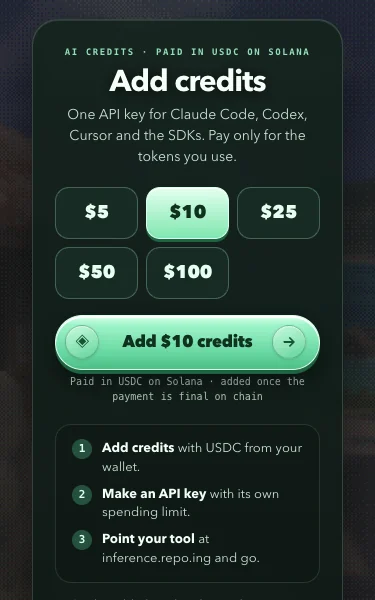
Step 1: Add credits Connect a Solana wallet at inference.repo.ing and pick an amount, from $5. 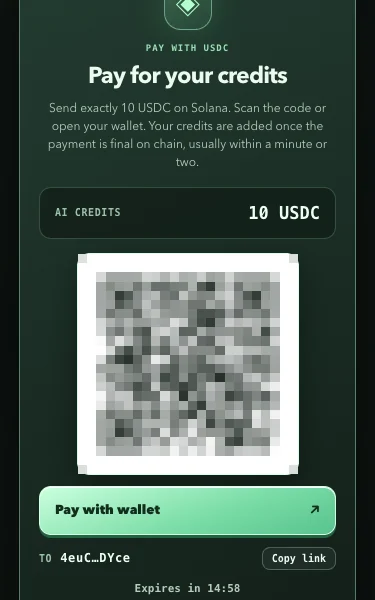
Step 2: Approve Approve the exact amount in your wallet, or scan the code. Your credits are added once the payment is final. 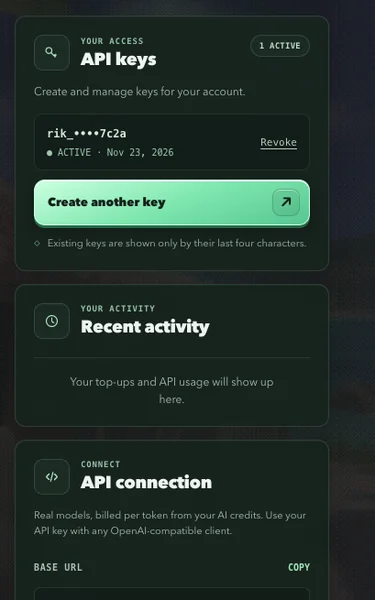
Step 3: Make a key Make an API key under Account, give it a spending limit, and point your tool at it.
Pay with USDC, credited once it’s final
Every top-up is a Solana Pay request for an exact amount. Open it in your wallet or scan the QR code, and approve. Developers can also ask for one with a key at /v1/usdc/purchases.
We read the payment from the chain ourselves, through two separate providers that have to agree, and add your credits once it is final. Each payment is credited exactly once, even if it is reported twice or lands while our server is restarting. A request you don’t pay simply expires.
Send the wrong amount, or pay the same request twice, and nothing extra is added. The payment is recorded and we’ll contact you about a refund.
The model you ask for is the model that answers
Every request names one exact model. If your key can’t use it, the request is refused before anything is charged. It is never sent to a different model.
If the provider answers with any model other than the one you named, you don’t get that answer and you pay nothing for it. Every response names the model that answered and what it cost, in the x-repoing-model and x-repoing-charged-micro headers.
A budget for every key
Make a key for each laptop, agent or project, each with its own spending limit. Raise or lower a limit at any time, or revoke a key and its next request is refused. /v1/credits shows a key’s balance, its limit and its last requests.
Credits are prepaid, so you can’t run up a bill. Before a request runs, we set aside enough to cover its largest possible cost. When it finishes, you pay for the tokens used and the rest comes straight back. Ten agents running at once still can’t spend past your balance or a key’s limit.
Retries are safe too: send an Idempotency-Key, and the same request is never charged twice. If a provider fails mid-answer, the credits set aside for it stay on hold until we check it by hand.
We keep the bill, not the words
Our ledger records each request’s model, tokens and cost. That’s what your balance and limits need. It does not keep your prompts or the answers.
What’s next
This is day one. Here is what isn’t here yet:
- Token-by-token streaming. Streamed requests work today, but the text arrives when the model has finished.
- The full Responses API. The preview takes function tools only and keeps no state, so send the whole conversation each time.
- Images, web search, prompt caching and token counting.
Try it now
repo.ing Inference is live. Connect a wallet, top up with USDC and send your first request at inference.repo.ing.
Credits pay for inference and nothing else. They are not an investment, so buy what you plan to use.
← → arrow keys move between posts